


It’s a Tuesday morning, the coffee is hot, the air is fresh, and you go to check your KDP dashboard. You worked hard on your book. You’re excited to see who bought it, and you want to know if your labor paid off. But scroll down to the royalty line and you see Amazon taking a cut — thirty percent off the top. No negotiations.
Many authors have just accepted this as the cost of being discoverable. But what if I told you, that isn’t true anymore?
Read on.
Related Article

The trend is already here
According to Written Word Media, thirty percent of working authors are already selling books directly to readers, avoiding Amazon entirely. And, get this, another thirty percent say they plan to start this year. YOU NEED TO BE PART OF THAT THIRTY PERCENT.
In addition, the authors making over ten thousand a month sell direct already.
Think about that. Top earners in the industry decided Amazon’s cut just wasn’t worth it anymore, and it paid off for them. The reasoning behind it is simple. They wrote an excellent book and Amazon takes a good chunk of their sales. Doesn’t matter how well written it was, or how loyal their readers are — Amazon gets a piece of the pie.
But when you do direct sales, having your own ISBN number, and distributing anywhere you want, you avoid the 30% tax. You set the price. You keep what’s left after printing and shipping. Nobody stands between you and the reader who already trusts you enough to be on your list.
So why hasn’t everyone done this already? Because the old version of “selling direct” meant building a Shopify store, learning inventory management, and hoping you could drive your own traffic to a website nobody’s heard of. That’s an entire business to run on top of writing books.
That version is dead now. DEAD. Oh, and the marketing creators still shouting about Shopify? You want to know why they are still beating that dead horse? It’s because Shopify PAYS to mention them in their YouTube videos, newsletters, and podcasts. Building a Shopify store in 2026 is literally the worst advice ever, and I’ll explain why.
Shopify only solves a problem you don’t have.
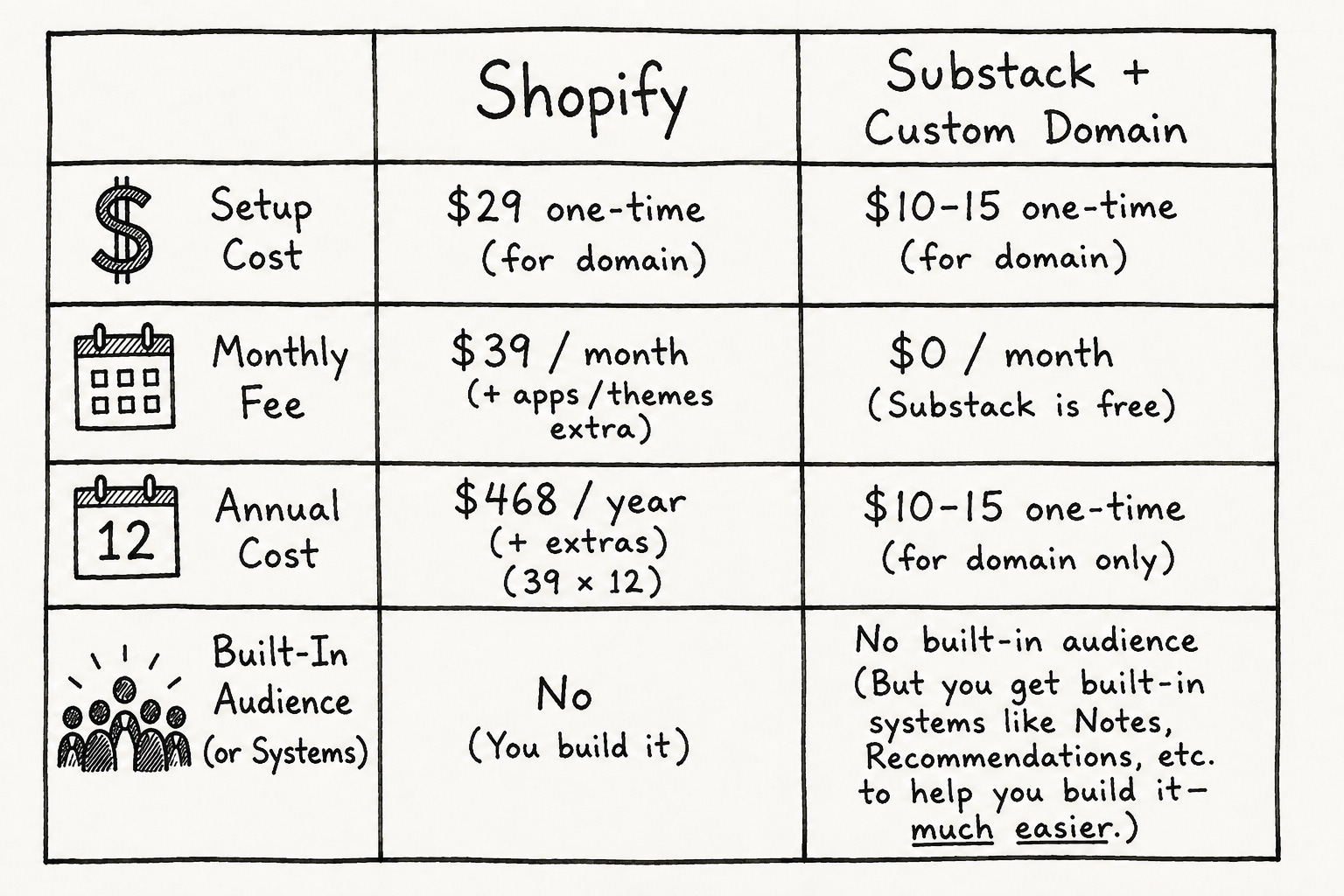
Shopify charges thirty nine dollars a month, plus transaction fees, for a storefront. That.Is.Ridiculous. That price makes sense if you’re starting from zero — with no audience, no traffic, and nothing but a product and a dream. Shopify’s whole pitch is: we’ll make you look legitimate and give you an app ecosystem to bolt on. Okay. That’s nice. But you’re still starting from zero and you still need to drive traffic to the website.
But here on Substack? You’ve already got a newsletter. You’ve got readers who open your emails and click your links because they know your voice. Shopify doesn’t send you a single one of those readers. It’s just a fancy online cash register — an expensive one at that — and they want thirty nine buckaroos every month just so you can “hope” to sell something.
You don’t have to do that here. Substack is basically a distribution engine that happens to also let you sell things. It pushes your writing through Notes, recommendations from other writers, and through its own discovery feed. People find you without you spending a dollar on ads. And connecting a custom domain costs a one-time fee of fifty dollars, plus whatever you pay a registrar for the domain itself. After that, there are no monthly fees. Nada. Zip Nothing ever billed again, except your custom domain — which is pretty cheap and affordable in most cases. I pay $12 a year for my custom domain:
So how do you make Substack your online-direct sales- bookstore? I’ll show you!
Step one: set up your Substack storefront
Start with a Substack publication. If you already have one running, you can build this directly inside it — you don’t need to start over.
Go into your settings and connect a custom domain. See the “related article” above if you need steps on how to do this.
This is a fifty-dollar, one-time step. Once it’s live, your publication has its own web address instead of living at yourname.substack.com, which matters for two reasons: it looks like a real bookstore to a new visitor, and it starts showing up in Google search results under your own name instead of Substack’s.
Your Notes feed and recommendation network stay fully intact after you connect a domain. You don’t lose Substack’s built-in discovery by going custom. You just add a layer of search traffic and branding on top of it.
Step two: get your own ISBN
This is important and a lot of authors miss this, so pay attention here. If you let Amazon assign you a free ISBN through KDP, that ISBN is locked to Amazon. You cannot use it to sell through print-on-demand, a bookstore, or anywhere else. That’s separate from KDP Select, which is the ebook exclusivity program — this is about the print ISBN itself.
The fix is straightforward. Get your own ISBN, either through your publishing imprint or purchased directly, before you set up your direct sales edition. That one decision is the difference between a book that can only ever live on Amazon and a book that can be sold anywhere you want, forever.
And, you can still publish to Amazon with your own ISBN.
Step three: connect print-on-demand fulfillment
This is where authors usually get stuck. Selling direct is one thing. Shipping a physical book to a stranger in Ohio is another thing entirely. Nobody wants to run a mailroom out of their house.
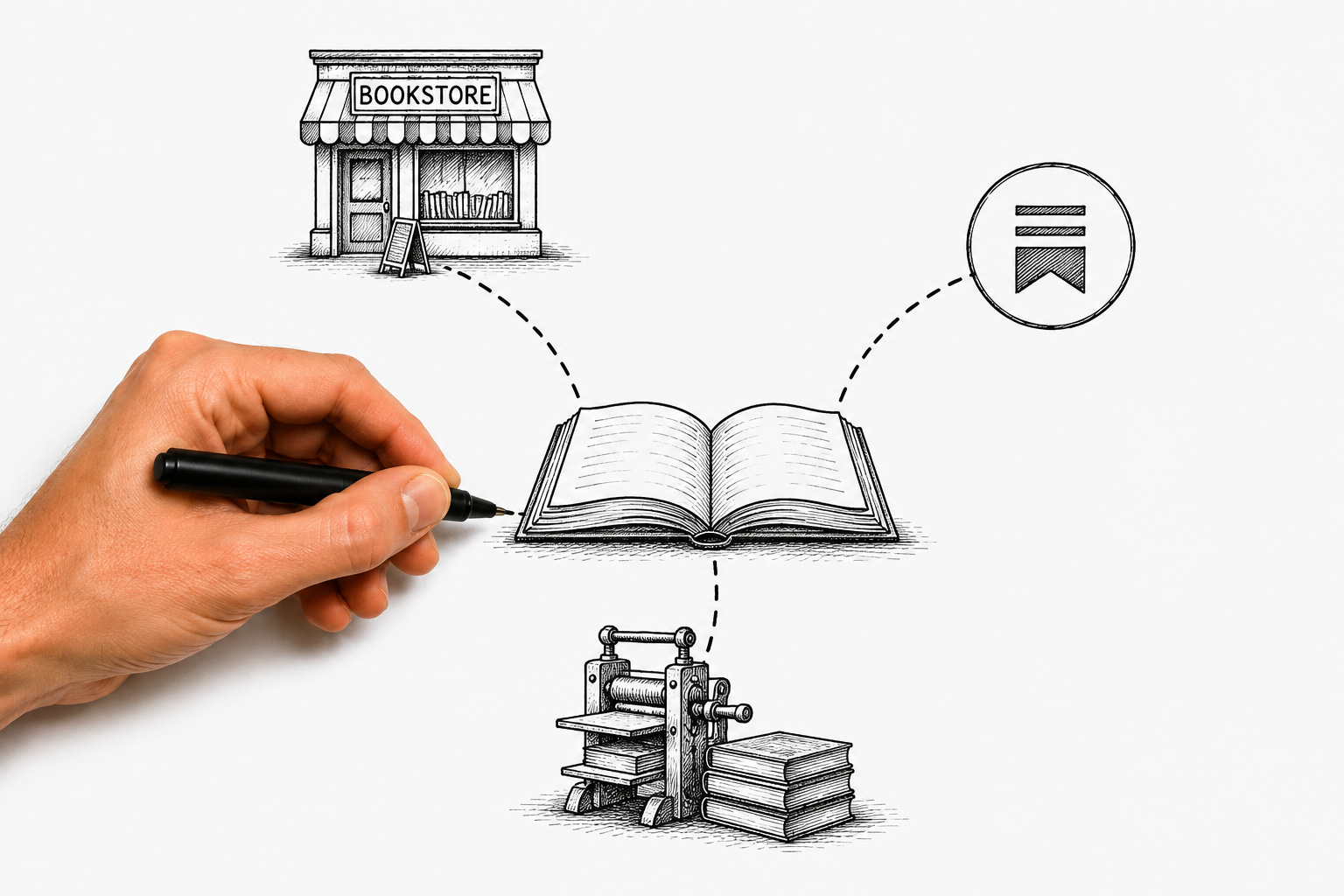
This is where a print-on-demand partner comes in, and it’s worth understanding exactly how it works, because it removes the one real obstacle standing between you and a functioning bookstore.
Nothing gets printed until a reader actually clicks buy. Here’s exactly how to get a title live on Bookvault, one of the platforms built for this.
How to upload your book to Bookvault
Create your account. Head to bookvault.app and click Sign-Up/Login. This gets you into your dashboard, where every title you publish will live.

Start a new title. From your dashboard, add a new book. You’ll be asked for the basics — title, author name, trim size, and binding type. Stick to paperback for U.S. direct sales, since that’s the format that prints domestically instead of routing through UK production.
Upload your interior file. This is your fully formatted manuscript, exported as a print-ready PDF. Bookvault checks it against your chosen trim size and page count automatically and will flag any formatting issues before you move forward.
Upload your cover file. Your cover needs to be sized to the exact spine width for your page count. Bookvault’s spine width calculator on their site can generate this for you if your designer hasn’t already built it to spec.
Order a proof copy. Before your book goes live for sale, order one printed proof for yourself. This catches anything a screen won’t show you — color shifts, margin issues, paper feel.
Connect your sell channel and go live. Once your proof is approved, Bookvault automatically generates a product page for your title through Bookvault Shop, their own hosted storefront. That page comes with its own shareable link. Copy that link and drop it straight into your Substack post as a hyperlink or button, wherever you want readers to buy. The moment it's live, your title is ready to sell.
When a reader buys, the order routes to Bookvault automatically. They print it, they package it, they ship it straight to the reader’s door. You never touch a copy. You never hold inventory. You never guess how many books to order and hope you don’t get stuck with a box of unsold copies in your closet.
For authors shipping within the United States, standard paperbacks print through a domestic print partner, which keeps shipping times and costs reasonable. The one exception is jacketed hardcovers — those still route through UK printing, which means a longer wait and a higher price tag for U.S. customers. Stick to paperbacks for your direct sales catalog and this isn’t an issue at all.
On pricing, there’s no flat percentage taken off the top. You set your own retail price. Your fulfillment partner charges you a print-and-ship cost based on page count and format. Whatever’s left over is yours. Getting a title live has a one-time setup cost of around twenty dollars per book. If you’re publishing a high volume of titles, paid monthly plans lower your per-book costs, but for most authors starting out, the free plan with the per-title setup fee is plenty.
Compare that to what a traditional retailer takes. Selling through a bookstore or wide retail channel usually means giving up thirty-five to fifty-five percent of the cover price before you see a dime. Direct sales through your own storefront is the highest-margin path there is, because nobody’s taking a cut just for standing between you and the reader.
Step four: embed the checkout link
Once your book is uploaded and connected, you’ll get a checkout link. Drop that link directly into your Substack posts — in a launch announcement, in your welcome post for new subscribers, anywhere a reader might be ready to buy.
A reader clicks it, pays, and the order fires off to fulfillment automatically.
What this actually looks like, start to finish
Strip away the jargon and the whole system is four steps. Start a Substack publication if you don’t already have one going. Connect a custom domain for that one-time fifty-dollar fee, which keeps your Notes feed, your recommendations, and your Google search traffic all working together instead of picking one or the other. Upload your book’s file and cover to your print-on-demand partner, and get your own ISBN if you haven’t already. Then embed your checkout link right into your posts, so a reader can go from reading your newsletter to holding a physical book in under a week, without you touching a single step in between.
That’s it. No warehouse or Shopify bill eating into your margin every month whether you sell anything or not. No Amazon standing between you and the reader who already decided they trust you enough to open your email.
Amazon still has its place — it dominates the market, and plenty of readers will still find you there first. But it doesn’t have to be where the sale actually happens. The thirty percent of authors already making real money outside of it figured that out first. The rest of us are just catching up.
Be the author that catches up.
— Thomas
Thanks for this informative article! Authors definitely have more options than they used to have. Now I am curious about print-on-demand options in Canada.
Thanks for this! I am not an Amazon fan and love every opportunity to help smaller businesses succeed! I will certainly give this a try!